REVIEW · NEW YORK CITY
Brooklyn Bridge Self-guided Bike Tour App – Audio + Written
Book on GetYourGuide →Operated by Unlimited Biking · Bookable on GetYourGuide
The Brooklyn Bridge gets easier with a plan in your pocket. This self-guided Brooklyn Bridge bike tour app lets you explore Lower Manhattan and Brooklyn at your own speed, using audio and written commentary tied to where you are. It also turns the walk or ride into a scavenger hunt of photo spots, TV and movie scenes, and practical food ideas.
I especially like the color-coded route concept, because it helps you choose what matters most instead of forcing one rigid path. I also love that the tour doesn’t end at viewpoints; it includes food recs and public restroom locations so you can keep moving.
One consideration: the experience leans on your phone’s geo-location services. If you’re not comfortable using a data plan for GPS, you’ll want to think ahead before you start pedaling.
In This Review
- Key things I’d watch for before you start
- Entering the route: start at Woolworth Building or 79 Chambers Street
- How the app guides you across the Brooklyn Bridge, without a tour group
- Lower Manhattan and bridge views: what the “primary route” gives you
- Movie-location stops: spotting the scenes you already know
- Photo-ops and beauty stops: how to get better shots while moving
- Food and restroom suggestions: the underrated reason this app works
- Bike or foot: choosing the pace that matches your energy
- Price and value: $5 makes sense if you like self-paced exploring
- Getting a code for your group and using it smoothly
- A quick reality check on reviews and expectations
- Should you book this Brooklyn Bridge bike tour app?
- FAQ
- How long is the Brooklyn Bridge Self-guided Bike Tour App valid?
- What is the price?
- Is the app refundable?
- Do I need to rent a bicycle?
- Where do I start if I rent a bike?
- Where do I start if I have my own bike or prefer to walk?
- What phone types does the app work on?
- Does the app require data?
- What’s included in this activity?
- Can multiple people use the same purchase for a group?
Key things I’d watch for before you start
- Geo-location guided stops: the app cues you as you reach each notable location.
- Audio plus written info: you can switch between listening and reading on the fly.
- Movie and TV location markers: pause for the scene you’ve already seen on screen.
- Photo-appeal stops: built in points to frame your shots without guessing.
- Food and restroom suggestions: practical breaks planned into the route.
- Self-guided pacing: ride or walk whenever you want, no group pressure.
Entering the route: start at Woolworth Building or 79 Chambers Street

Your starting point depends on what you’re doing with your bike. If you rent one, you’ll meet at Unlimited Biking at 79 Chambers Street. If you’re bringing your own bike, or you’d rather walk, you can begin at the Woolworth Building.
That choice matters more than it sounds. When you start where the route makes sense for your pace, you waste less time figuring out how to get rolling. And because this is self-guided, the first few minutes set the tone for whether the rest feels smooth or stressful.
Also note what’s not included. The price covers access to the app tour, not bike gear like a helmet, bike bag, or bike lock. So if you’re planning to rent or bring gear, you’ll want to handle that separately.
You can also read our reviews of more cycling tours in New York City



How the app guides you across the Brooklyn Bridge, without a tour group
This is an app-based tour with geo-location. Once you download it (free) and turn on location services, you follow the stops as you move along the route. The design is meant for independent exploring, not a scheduled ride where you have to keep up with strangers.
The route is organized with a color-coded map. That’s your invitation to choose your own adventure. You’re not just clicking through random points; the app groups stops by type, like the primary tour route, movie locations, and photo-focused spots.
You’ll also see that every stop is paired with short commentary. The primary route includes written and audio material: brief history, fun facts, and context so you’re not staring at buildings and guessing. If you prefer audio while riding and text while walking, this app supports that rhythm.
Finally, the app is set up to work across a full year. It’s valid 365 days from your first activation, so you’re not boxed into one narrow trip date.
Lower Manhattan and bridge views: what the “primary route” gives you
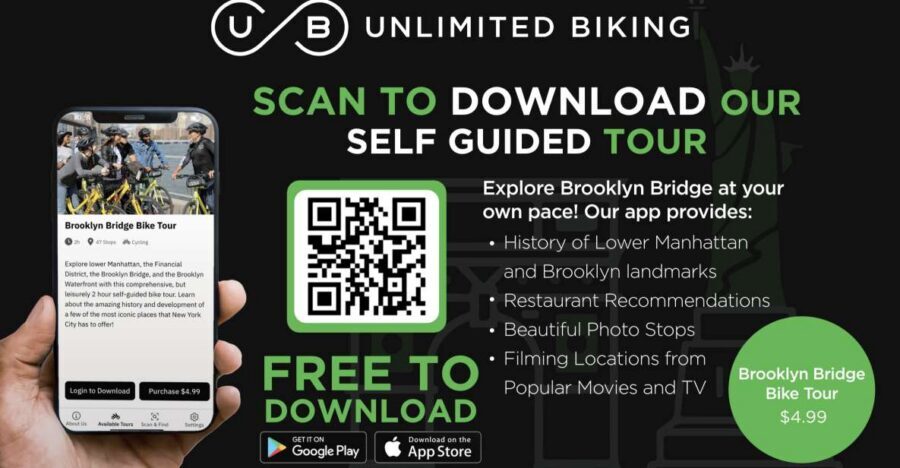
The heart of the experience is the primary tour route, which strings together notable locations across Lower Manhattan and Brooklyn. As you reach each stop, the app provides a short explanation plus fun facts, in both written and audio format.
For your brain, this is the sweet spot. You get just enough background to make the skyline feel like something you understand, not just something you pass. You’re also not stuck reading a wall of text while you’re trying to stay aware of traffic and pedestrians.
The “brief history” style is useful because you can keep your momentum. You don’t have to commit to a museum-length stop. You can pause, get the gist, grab a photo, and move on with your day.
A practical advantage: because it’s tied to where you are, you don’t have to keep checking a guidebook back at your hotel. You can keep your attention where it belongs, on the bridge, the streets, and the next good photo angle.
Movie-location stops: spotting the scenes you already know
One of the most fun parts is the section marked for locations from television and movies. The app points you to iconic scenes and explains where they were filmed, so the bridge walk becomes a pop-culture route too.
This is a great fit if you like two kinds of travel: sightseeing and recognition. Seeing a landmark is nice. Seeing it through a film memory makes it more personal and more specific.
How to use this without slowing down too much: treat movie stops as “quick pause” moments. Look at the framing the app suggests, take your shot, and then keep moving. That way you get the payoff without turning the ride into a half-day detour.
Photo-ops and beauty stops: how to get better shots while moving
Not every stop is just informational. The app also includes places that are notably beautiful and photo-appeal. You’ll get prompts to take a snapshot there, and they even encourage sharing on social media.
This matters because good photos in New York often come from angles and timing, not just location. The app helps you plan the “when to stop” part. Instead of hunting for the perfect place on your own, you get a ready list of likely winners.
Still, keep expectations realistic. You’re on a public route with other pedestrians and cyclists. The app can tell you where to aim, but it can’t control crowds or traffic. Your best tool is quick timing: pause, shoot, and move when there’s space.
You can also read our reviews of more guided tours in New York City






Food and restroom suggestions: the underrated reason this app works
Here’s the part that can save your whole day: recommendations for food along the route and locations for public restrooms. That’s not glamorous, but it’s exactly what turns a nice ride into a comfortable one.
When you’re crossing Lower Manhattan and heading into Brooklyn, you’re dealing with real-world pacing. You might think you can handle your hunger and bathroom needs until you’re done. Then the day stretches, your legs get tired, and you start wishing you planned earlier.
Because the app includes restroom locations, you can make smarter stops. And because it also suggests food, you can align your breaks with places that are worth aiming for, instead of grabbing whatever is closest.
The best way to use these tips is to treat them like “options,” not demands. If you hit a restroom stop and it’s not convenient at that moment, you can keep rolling and come back later within your chosen pace.
Bike or foot: choosing the pace that matches your energy
The experience works whether you ride or walk. That flexibility is one reason apps like this can feel less exhausting than a fixed tour.
If you bike, you’ll appreciate the audio and stop-by-stop guidance while you move. Audio is especially handy when you don’t want to take your eyes off the road for long. If you walk, reading can feel easier at each stop, and you can take in the views without speed pressure.
Either way, you control the rhythm. The app is built for “pause when you want,” not “hurry to the next group briefing.” That’s a big value for anyone visiting for the first time, too, because you can stop longer at the parts you care about most.
Price and value: $5 makes sense if you like self-paced exploring
At $5 per person, this is a low-cost way to add structure to a Brooklyn Bridge day. The price isn’t buying a guide with a microphone. It’s buying your navigation, commentary, and on-the-go recommendations in a single app.
That can be a great deal if you’ll actually use the features: audio, written stops, movie locations, photo prompts, food ideas, and restroom locations. If you just want the bridge, you could also do it with a quick internet search. But if you want the “what am I looking at, where was that scene shot, and where should I eat” bundle, the app is priced like a bargain.
One more value twist: the product is valid for 365 days from first activation. You can plan the ride now and still feel flexible about when you use it.
The app is also described as wheelchair accessible. The tour experience itself is self-guided, so you’re in charge of the route and pace, which can help for mobility needs.
Getting a code for your group and using it smoothly
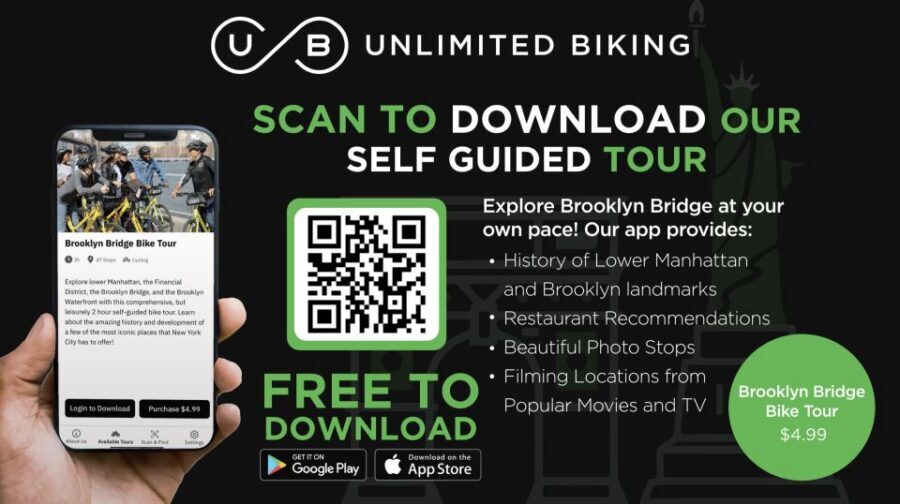
If you’re traveling with friends or family, there’s a group-friendly detail. Purchasing provides a code that can be used by all members of your group. If you have more than one person using phones, you only need to purchase for one customer, then everyone can use the same code on their phones.
That keeps the cost down and avoids the awkward “who paid” problem when you’re trying to start together. It’s also practical if you’re splitting up briefly for photos and then regrouping later.
A quick reality check on reviews and expectations
The rating shown is 3 out of 5 based on 3 reviews, which is a small sample. One standout feedback described the app as comprehensive, a strong guide for first timers who like going at their own pace, and praised the way it helped find recommended restaurants and bathrooms while riding, plus getting great photos.
So the signal I’d take is this: if you like independent exploring and you’ll actually follow the prompts, you’re likely to enjoy it. If you need a live guide or a fully planned route with no decision-making, you might prefer something more structured.
Should you book this Brooklyn Bridge bike tour app?
Book it if you want a low-cost way to understand what you’re seeing and make the day more comfortable. For $5, the combination of audio and written stop info plus food and restroom suggestions is the kind of practical value that adds up on a long walking or biking day.
Also book it if you enjoy mixing sightseeing with recognition. Movie and TV location markers can turn a familiar landmark into something you look at twice.
Skip it if you know you won’t use a phone for guidance, or if you’re not comfortable relying on geo-location services and a data plan. In that case, you may find yourself fighting the tech instead of enjoying the bridge.
If you’re deciding last-minute, my simple rule is: if you like self-guided travel and you’re the type who stops for photos and snacks, this app fits. If you prefer a hands-on guide, you’ll probably want a different option.
FAQ
How long is the Brooklyn Bridge Self-guided Bike Tour App valid?
It is valid for 365 days from your first activation.
What is the price?
The price listed is $5 per person.
Is the app refundable?
This activity is non-refundable.
Do I need to rent a bicycle?
Use of a bicycle is not included. You can rent one through GetYourGuide if you want.
Where do I start if I rent a bike?
If you rent a bike, head to Unlimited Biking at 79 Chambers Street.
Where do I start if I have my own bike or prefer to walk?
You can begin at the Woolworth Building.
What phone types does the app work on?
The app is available for Android and iPhone users.
Does the app require data?
The app requires geo-location services, and a data plan is recommended for use of the application.
What’s included in this activity?
You get a self-guided Brooklyn Bridge bike tour in the Unlimited Biking Tour app with geo-location services.
Can multiple people use the same purchase for a group?
Yes. Purchasing provides a code that can be used by all members of your group, so you can purchase for one customer and share the code on everyone’s phones.